Here is how it usually goes. A nonprofit picks a volunteer system. A year later someone asks, "How do we know every volunteer did the food safety training?" or "Where are the signed waivers?" The system can't answer. So the search starts: LMS for nonprofits.
A learning management system (LMS) is software for building and assigning courses: lessons, videos, quizzes, completion certificates. They are good tools. But most volunteer programs shopping for one don't need a course platform. They need one rule enforced: a volunteer who hasn't been trained can't take the shift. An LMS, on its own, can't do that, because it doesn't know your schedule.
What volunteer training actually has to do
Look at what most programs mean by "training":
- A short orientation or quiz (food safety, safety rules, how we treat guests)
- A signed volunteer agreement or waiver, in your exact words
- Sometimes a staff sign-off or a short conversation
- Renewal every year or two
- Proof, when a funder, insurer or regulator asks
That is a gate, not a course catalog. The question that matters is not "did they finish module 3?" It is "is the person on Saturday's shift cleared to be there?"
When a nonprofit does need an LMS
- Long, multi-lesson courses with video
- Continuing education credits or accredited certificates
- Staff compliance training (HR, harassment, HIPAA) across many employees
- Courses you sell or share with other organizations
- Training is a quiz, an agreement and a sign-off
- What you care about is who is allowed on which shift
- Volunteers already balk at one more login
- You'd be paying per seat for people who serve twice a year
If the first list sounds like you, buy the LMS and link it from your volunteer system. If the second one does, an LMS adds a login, a bill and a spreadsheet someone has to check against the schedule by hand.
The real problem: training that doesn't know the schedule
When training lives in a separate system, it drifts away from the schedule. The quiz is done in one place, the waiver is a PDF in someone's inbox, and the shift list is in a third place. Every week a coordinator cross-checks names. Someone gets missed. Certifications expire and nobody notices until the day of.
The fix is to put the training where the sign-up happens.
A checklist for volunteer training that holds up
- Gate the event, not the person's inbox. If an event needs training, the sign-up should stop and ask for it.
- Use your own words. Your waiver's release and liability language should be signed exactly as written.
- Score the quiz. Reading isn't the same as knowing. Require the right answers to move on.
- Decide who approves. Some roles need a staff sign-off; others can self-qualify.
- Set an expiration. Training that never expires is training nobody refreshes.
- Keep the record with the volunteer. When someone asks for proof, it should be one click, not a binder.
Hospices: training is a federal rule
For hospices, volunteer training isn't optional. Medicare's hospice rules say the hospice "must maintain, document, and provide volunteer orientation and training that is consistent with hospice industry standards," and that volunteers must provide services equal to at least 5 percent of the total patient care hours of paid staff and contractors (42 CFR 418.78).
That is two records a surveyor can ask for: who was trained, and how many hours volunteers gave. Both are easier when training, scheduling and hours live in the same place.
How Serve.Love does it
Serve.Love is volunteer management software, not an LMS. Training is built into sign-up through certifications, which come with every plan.
Paste what you already have. Copy your quiz from an email or a Word document and it becomes a scored form. Paste your agreement and it becomes checkboxes, a signature and a date, with your wording kept word for word.
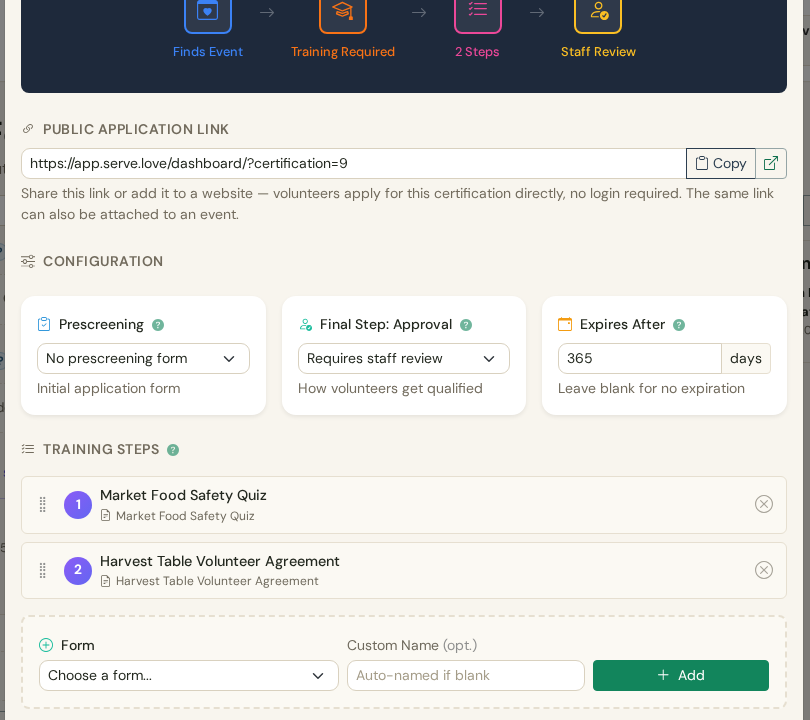
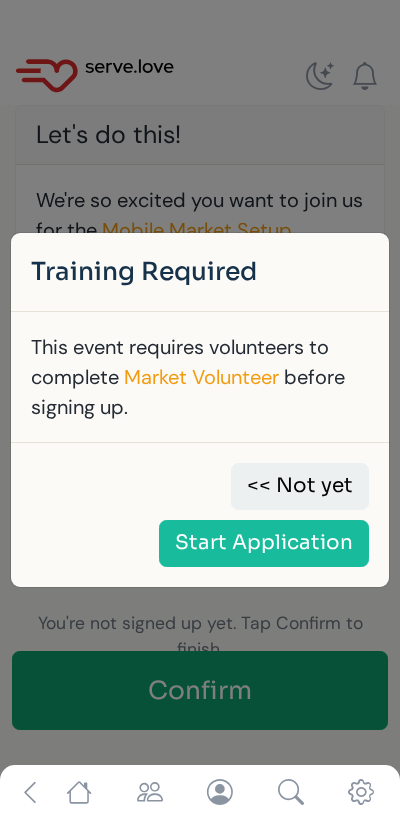
Turn it on for an event. When an untrained volunteer taps Confirm, they get "Training Required" and a Start Application button instead of a spot. They do the quiz and sign on their phone, in English, Spanish or French, with no app to install. Volunteers who are already certified never see it.
Approve in one click. Waiting applications show up on the event and your Reports page with their answers and signed agreement. Approve, and they can sign up. Certifications expire when you say, and staff can revoke one any time.
Then the door. With Serve.Love Pro, an iPad at your entrance checks volunteers in and out. Someone who isn't cleared still gets checked in (never turn away a person standing at the door), but staff see it right away and the volunteer is asked to stop by the front desk. After the event a manager approves the hours, and verified hours letters build themselves.
See the whole flow with a sample food pantry, screen by screen.
Certification walkthrough Book a demoThe short answer
If you run long courses or staff compliance programs, an LMS is worth it. If you need volunteers trained, signed and approved before they show up, you need training that is part of the sign-up. Most nonprofits are in the second group, and they find out after they've already bought a volunteer system that can't do it.
More on how it works: volunteer training and certification in Serve.Love.
Source
42 CFR 418.78, Conditions of participation: Volunteers (hospice), via the Legal Information Institute, Cornell Law School. Read November 15, 2026.