For programs where volunteers have to be trained first

Only Trained Volunteers Get on the Schedule

Food safety, a signed waiver, an orientation, a staff sign-off. Serve.Love builds your volunteer training into sign-up itself, so nobody takes a shift they are not cleared for, and nobody on your team has to chase paperwork.

Minutes
to set up: paste the quiz and waiver you already have
1 click
for staff to approve a volunteer
0
untrained volunteers on a shift that needs training

The Problem With Most Volunteer Training

Most organizations pick their volunteer software first and think about training later. Then they find out the system can't train or certify anyone. So training ends up somewhere else: a binder, a slideshow at orientation night, a form emailed back and forth, or a separate LMS with its own login and its own per-seat bill.

None of those know who is on Saturday's schedule. A coordinator ends up checking a spreadsheet against a sign-up list, and someone who never did the food safety quiz is still handing out food.

The fix is simple: put the training on the sign-up. If an event needs it, the volunteer does it before the spot is theirs.
How It Works

Screens from our walkthrough, with a sample food pantry.

1. Paste the quiz you already have

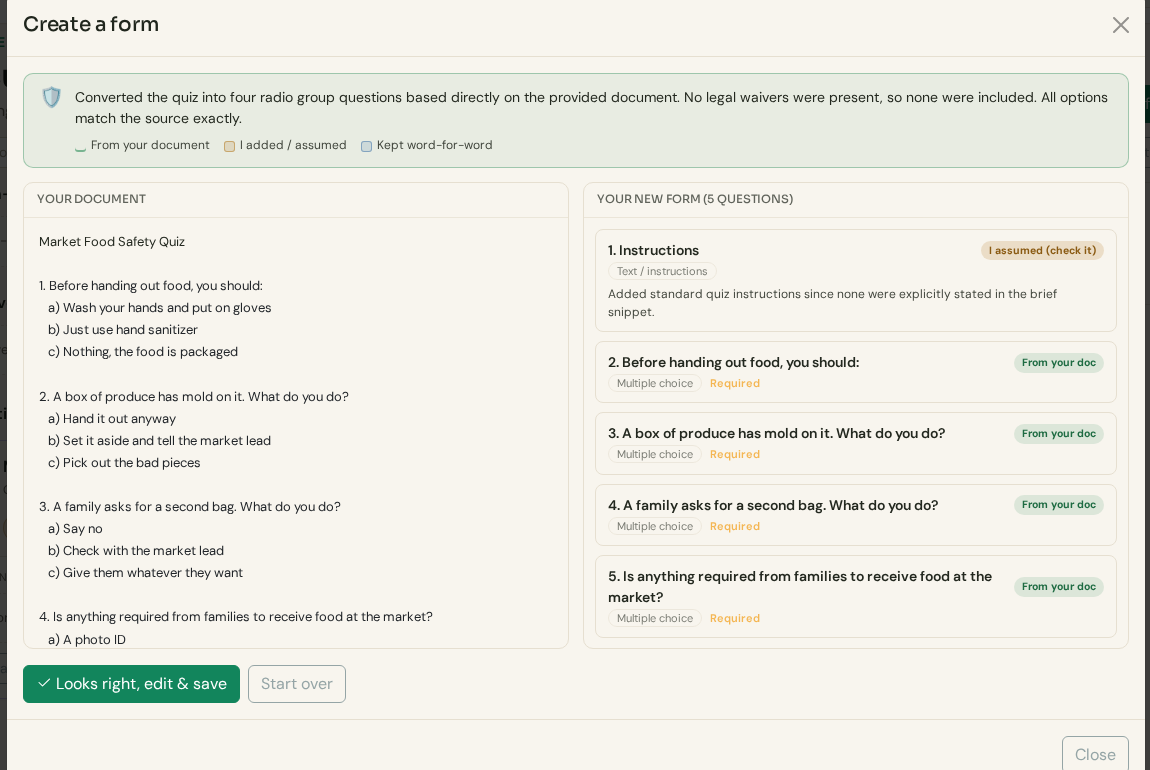
Copy your questions from an email or a Word document. Serve.Love turns them into a form and tags each question so you can see what came from your document. Tap the right answer on each one and it becomes a scored quiz.

Paste your volunteer agreement too. It becomes checkboxes, a signature and a date, with release and liability wording kept word for word.

A pasted food safety quiz turned into a scored form, each question tagged From your document
Your document on the left, the new form on the right.

2. Build the path once

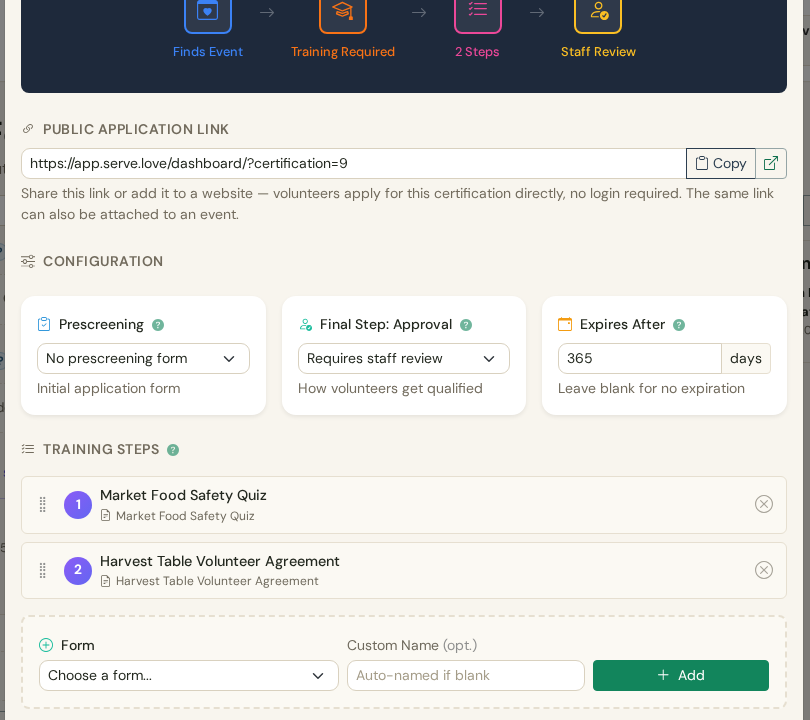
Name the certification, add the steps in order (quiz, then agreement), and decide how it ends: a staff sign-off, or qualified as soon as the steps are done. Set how long it lasts, like a year.

You also get a public application link for your website, so people can get certified before they pick an event.

Certification setup: public application link, staff review, expires after 365 days, two training steps
Two steps, a staff review, good for 365 days.

3. Turn it on for an event

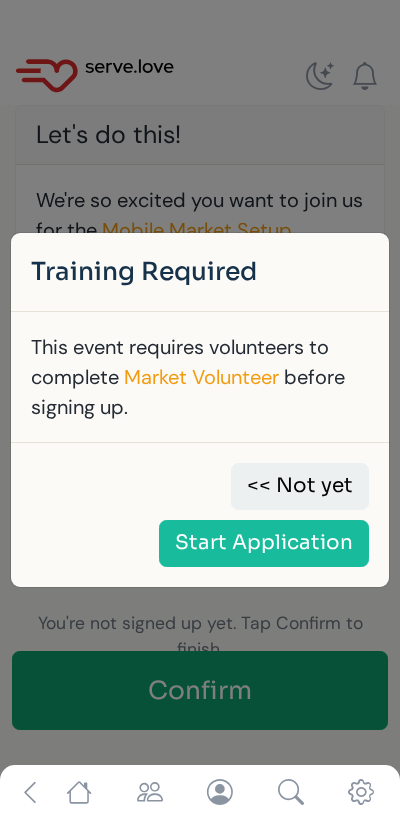
Open the event, pick the certification. Same link, same flyer. When a volunteer who isn't certified taps Confirm, they see "Training Required" and a Start Application button instead of a spot.

Volunteers who are already certified never see it. They sign up like normal.

Phone screen: Training Required, this event requires volunteers to complete Market Volunteer before signing up
What an untrained volunteer sees at sign-up.

4. They train on their phone

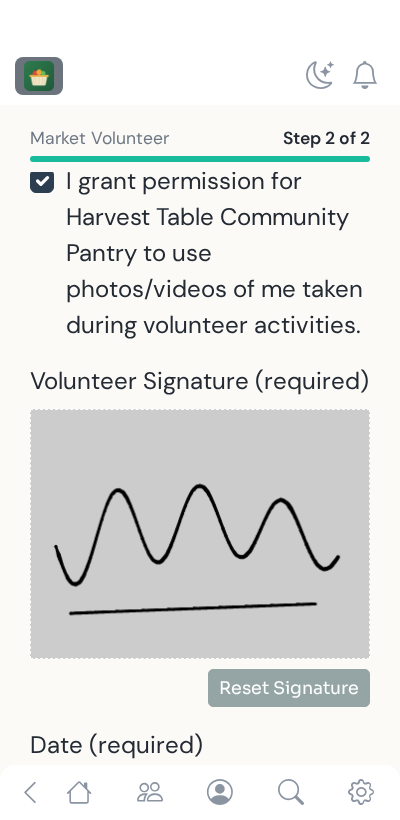
The quiz, then the agreement, signed with a finger. "Step 1 of 2" shows how much is left. No app to install, and it runs in English, Spanish and French.

Phone screen: volunteer agreement with checkboxes and a finger signature
The agreement, signed on the phone.

5. Approve in one click

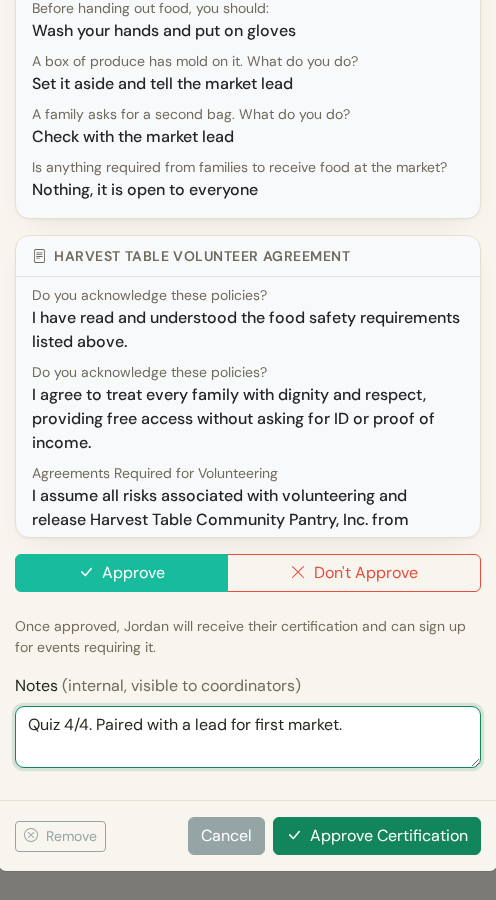
Waiting applications show up on the event and on your Reports page. You see their answers, the signed agreement and how many events they have already worked. Approve, and they get an email and can sign up.

Not approved? Say so, add a private note, and they can't reapply right away.

Coordinator review: quiz answers, signed agreement, Approve and Don't Approve buttons
The coordinator's review.

Where Training Pays Off

Food pantries and mobile markets

Food safety basics and a dignity-first agreement before anyone hands out food.

Hospice and health care

Orientation, confidentiality and a signed agreement before a volunteer is with a patient or family, with a staff sign-off every time.

Big events

Role training for gate, parking, first aid support or cash handling, required only on the shifts that need it.

Youth, outreach and crisis programs

Background-check confirmation, safety training and a coordinator interview, gated before the first shift and renewed every year.

Separate LMS vs. Serve.Love

A separate training systemServe.Love
LoginsOne more account for every volunteerSame sign-up they already use
Knows the scheduleNo, someone checks it by handYes, the event won't take them until they're trained
Your waiverUploaded as a file, signed somewhere elseSigned inside the training, word for word
ExpirationA spreadsheet reminderExpires on its own, retrained before the next shift
CostOften priced per seatIncluded on every plan

Then the Door and the Hours

Training is the first half. With Serve.Love Pro, an iPad at your volunteer entrance checks people in and out. If someone who isn't cleared walks up, they still get checked in (we never turn away a person at the door), staff see it right away, and the screen asks them to stop by the front desk first. After the event, a manager approves the hours, and verified hours letters build themselves from what was approved.

Door check-in walkthrough · Hours approval walkthrough · Do nonprofits need an LMS?

Serve.Love runs volunteer programs for organizations like BeHeard Movement and Cave Creek Rodeo Days.

Common Questions

Do we need a separate LMS for volunteer training?

Most volunteer programs do not. A learning management system is built for long courses and employee compliance, and it does not know your schedule. Serve.Love puts the training where it matters: on the sign-up. A volunteer who has not finished it cannot take the shift. If you already have long video courses elsewhere, link to them as a step and keep the quiz, the agreement and the approval in Serve.Love.

Can we use the quiz and waiver we already have?

Yes. Paste your quiz from an email or a Word document and it becomes a scored form. Mark the right answers and a volunteer has to get them right to move on. Paste your agreement and it becomes a form with checkboxes, a signature and a date, with your release and liability wording kept exactly as you wrote it.

Does a person have to approve every volunteer?

You choose. Set a certification to need a staff sign-off at the end, or let volunteers who pass the steps qualify on their own. Either way, waiting applications show up on the event and on your Reports page, and approving is one click.

How long does a certification last?

You set it, for example 365 days, or leave it blank for no expiration. When it runs out, the volunteer takes the training again before signing up for events that need it. Staff can also revoke a certification at any time.

What happens if someone without the training shows up at the door?

With door check-in (Pro), we never turn away someone standing at the door. They are checked in, staff see that they are not cleared, and the screen asks them to stop by the front desk first. It shows up again when a manager reviews the hours.

Does it work in Spanish?

The training flow runs in English, Spanish and French for volunteers, on their phone, with nothing to install.

What does it cost?

Certifications come with every Serve.Love plan. Most programs that train volunteers also run Serve.Love Pro for door check-in, manager hours approval, verified hours letters and texting: $63 a month billed yearly ($756 a year), or $70 billed monthly.

Training, Door Check-In and Verified Hours, Together

$63
a month, billed yearly ($756/year)
$70
a month, billed monthly

We set it up with you on a short call: your quiz, your agreement, your events.